Switch for GoPro1.1
Publisher Description



Remote control your GoPro
This App helps you control GoPro wirelessly by connect to your GoPro HERO camera via WiFi. You can watch video or photo in your GoPro camera on your phone, download them directly to your phone. You can also use this App to trigger take photo or video and change GoPro settings.
Demo video: https://youtu.be/-qN1sT-RsL8
Features:
- Switch shutter mode between Video, Photo, and Timelapse modes.
- Record video, take photos or timelapse by remote control mode.
- Discover and pair with your GoPro hero automatically.
- Change camera settings (resolution, frame rate, shutter time, exposure compensation, white balance, GPS etc.).
- Automatically connect to the camera's Wifi network.
- Delete media file, format SD card.
- Video and photo preview.
- Power off the camera.
- Download media (photos, videos) over Wifi.
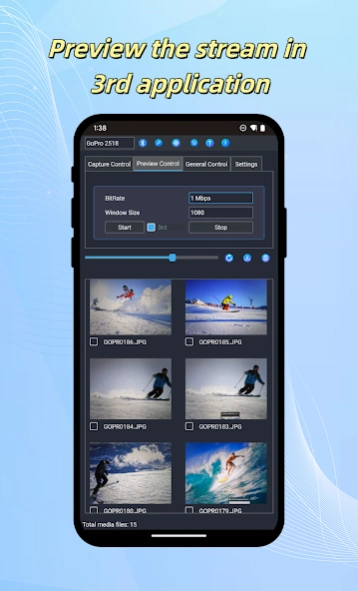
- Activate the camera video stream and view it in 3rd applications.
- Compatible with GoPro Hero4, Hero5, Hero6, Hero7, Hero9, Hero10, Hero11, Hero12.
About Switch for GoPro
The company that develops Switch for GoPro is John Li. The latest version released by its developer is 1.1.
To install Switch for GoPro on your Android device, just click the green Continue To App button above to start the installation process. The app is listed on our website since 2024-01-18 and was downloaded 8 times. We have already checked if the download link is safe, however for your own protection we recommend that you scan the downloaded app with your antivirus. Your antivirus may detect the Switch for GoPro as malware as malware if the download link to com.woiapp.gopro is broken.
How to install Switch for GoPro on your Android device:
- Click on the Continue To App button on our website. This will redirect you to Google Play.
- Once the Switch for GoPro is shown in the Google Play listing of your Android device, you can start its download and installation. Tap on the Install button located below the search bar and to the right of the app icon.
- A pop-up window with the permissions required by Switch for GoPro will be shown. Click on Accept to continue the process.
- Switch for GoPro will be downloaded onto your device, displaying a progress. Once the download completes, the installation will start and you'll get a notification after the installation is finished.
Program Details
System requirements
Download information
Pricing
Version History
version 1.1
posted on 2024-01-19
- Bug fixes and other optimizations.
- Turn off GoPro into sleep mode to save battery.
